
You’ve written your book. You’ve edited it. You’re ready to publish.
Then you open Amazon KDP’s dashboard and realize you have no idea what you’re doing.
File formats. Trim sizes. Margins. Bleed. Interior formatting. Cover specifications. The technical requirements feel overwhelming when all you wanted to do was get your book in front of readers.
Amazon KDP is the largest self-publishing platform in the world. Getting your formatting right isn’t optional if you want your book to look professional and avoid costly reprints or negative reviews about formatting issues.
Here’s what you need to know to format your book for Amazon KDP US without losing your mind in the process.
Why Amazon KDP Formatting Requirements Matter
Amazon doesn’t accept just any file you upload. They have specific technical requirements that your book must meet.
For ebooks, you need properly formatted files that display correctly across Kindle devices, tablets, phones, and desktop apps. For print books, you need precise margins, appropriate bleed settings, and covers that match exact dimensional specifications.
Get the formatting wrong and you’ll face:
· Rejected uploads that delay your publication timeline
· Poor reader experience with broken formatting on certain devices
· Negative reviews complaining about layout issues
· Wasted money on proof copies that need to be reprinted
Professional book formatting for Kindle and print isn’t just about making things look nice. It’s about meeting technical standards that ensure your book functions properly across all formats.
How Kindle Ebook Formatting Differs from Print
Many authors assume they can upload the same file for both ebook and print versions. That’s wrong.
Ebooks are reflowable, meaning text adjusts to screen size and reader preferences. Print is fixed, meaning every page looks exactly as designed.
For Kindle ebook conversion services US, your file needs:
· Proper heading styles using Word or HTML heading tags, not just large bold text
· Embedded fonts if using anything beyond standard options
· Optimized images compressed for file size but clear enough for high-resolution displays
· Clean formatting without manual line breaks or excessive spacing
· Working table of contents with clickable navigation links
KDP accepts multiple file formats for ebooks, including DOC, DOCX, HTML, MOBI, and EPUB. Most authors use DOCX because it's familiar, but proper formatting within that file is critical. If you'd rather not handle the conversion yourself, affordable ebook conversion for Kindle is worth looking into.
Why KDP Print Interior Formatting Requires Precision
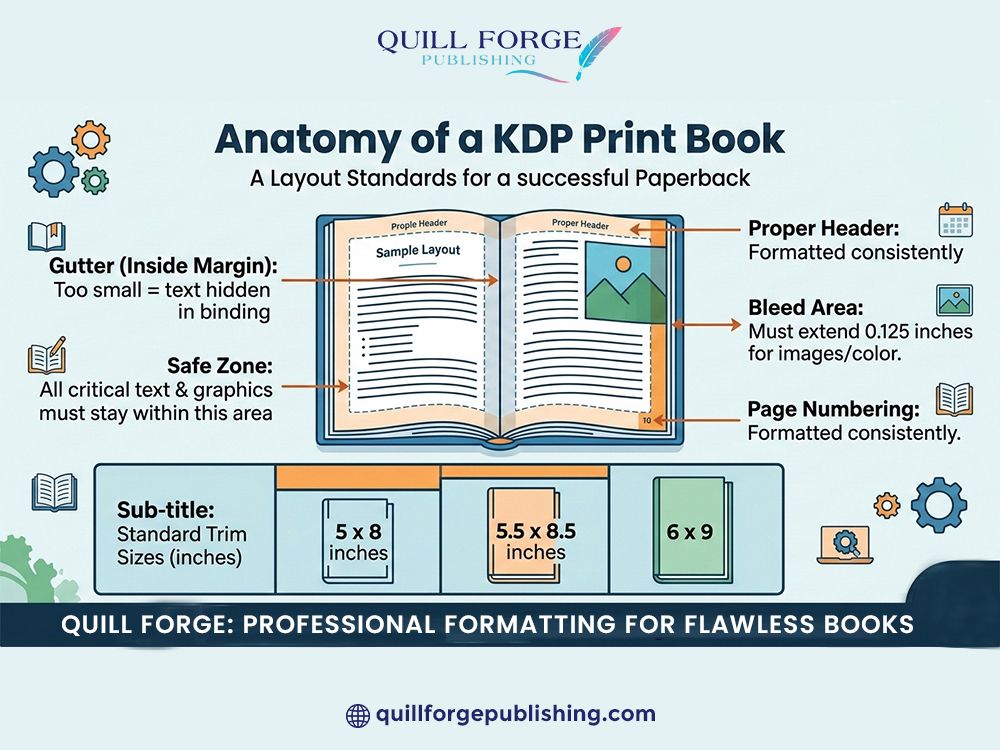
Print formatting for Amazon KDP follows strict technical requirements based on your chosen trim size.
Standard trim sizes include:
· 5 x 8 inches (common for fiction)
· 5.5 x 8.5 inches (common for nonfiction)
· 6 x 9 inches (versatile for multiple genres)
· 8.5 x 11 inches (workbooks, textbooks)
Each trim size has specific margin requirements. Amazon requires minimum inside margins (the gutter) to ensure text doesn’t disappear into the binding.
KDP print interior formatting also includes:
· Bleed settings if your interior has images extending to page edges
· Page numbering positioned correctly within safe zones
· Chapter headers formatted consistently throughout
· Font embedding to ensure text displays as intended
One common mistake: authors create their manuscript in standard letter size (8.5 x 11) and try to convert it to 6 x 9 without adjusting formatting. The result is awkward spacing and margins that look amateurish.
How to Handle Cover Files for Amazon KDP
Amazon KDP cover requirements are notoriously precise. Your cover dimensions must match your book’s page count and paper type exactly.
Amazon provides a cover calculator that generates exact dimensions based on:
· Trim size
· Page count
· Paper type (white or cream)
· Binding type (paperback or hardcover)
Your cover file must include front cover, spine, and back cover as a single PDF with bleed extending 0.125 inches on all sides.
Professional design services create covers that meet these specifications from the start, saving you the frustration of repeated upload rejections. Before you upload, it's worth running your cover against a book cover design checklist for Amazon.
Why Quill Forge KDP Setup Services Simplify the Process
Navigating Amazon KDP’s technical requirements while also being the author creates unnecessary stress.
Quill Forge KDP setup services handle the entire technical process:
· Converting your manuscript into properly formatted ebook files
· Creating print-ready PDFs with correct margins, bleed, and specifications
· Generating cover files that meet exact dimensional requirements
· Uploading files and configuring your KDP account settings
· Ordering and reviewing proof copies before approving for publication
Their publishing team deals with Amazon’s systems daily and catches formatting issues before they become problems.
For authors who want professional results without becoming technical experts, Quill Forge removes the learning curve entirely.
How Ebook Formatting for Apple Books Differs from Kindle
Many authors publish on multiple platforms beyond Amazon. Apple Books is one of the largest alternatives.
Ebook formatting for Apple Books has different requirements than Kindle:
· EPUB format preferred over MOBI or other Kindle formats
· Different CSS styling for optimal display on Apple devices
· Enhanced formatting options like fixed-layout for illustrated books
· iTunes Producer tool for uploading rather than KDP dashboard
The good news is that a properly formatted EPUB file works across multiple platforms including Apple Books, Barnes & Noble Nook, Kobo, and Google Play Books.
Professional Kindle ebook conversion services US typically create both Kindle-optimized files and standard EPUB files for wide distribution.
Why US KDP Formatting Services Understand Regional Requirements
Amazon operates KDP platforms in multiple countries with slightly different requirements and options.
US KDP formatting services understand:
· Expanded distribution options available specifically through KDP US
· Tax requirements for US-based authors versus international authors
· Pricing strategies that work in the US marketplace
· Category and keyword optimization specific to US retail algorithms. Getting your formatting right pairs naturally with book metadata optimization for Amazon so your book is discoverable once it's live.
How Professional Formatting Affects Reader Experience
Readers notice bad formatting immediately. They might not articulate exactly what’s wrong, but they feel it.
Poor ebook formatting shows up as:
· Inconsistent spacing between paragraphs
· Images that don’t scale properly on different devices
· Chapter breaks that appear mid-screen
· Table of contents that doesn’t link correctly
· Text that runs off the edge of the screen
Poor print formatting appears as:
· Text too close to the binding that’s hard to read
· Inconsistent margins throughout the book
· Awkward page breaks in the middle of paragraphs
· Headers or page numbers positioned incorrectly
Professional formatting is invisible when done right. Readers simply enjoy your book without technical distractions.
Why Editing Comes Before Formatting
Many authors want to format their book before editing is complete. That’s backwards.
Editing changes your manuscript. Sometimes significantly. Adding or cutting paragraphs, restructuring chapters, or revising sections means your formatting has to be redone.
Always finalize your manuscript through editing before moving to professional formatting. This saves time and prevents wasted work.
Quill Forge’s editing services ensure your manuscript is publication-ready before their design team handles formatting. This integrated approach prevents costly back-and-forth revisions, and helps you sidestep some of the biggest first-time author mistakes to avoid.
How Design Impacts Overall Book Quality
Formatting is technical. Design is creative. Both matter.
Professional design services choose appropriate:
· Fonts that match your genre and enhance readability
· Heading styles that create visual hierarchy
· Spacing and leading that improve reading flow
· Chapter openings that add professional polish
Good design doesn’t call attention to itself. It simply makes your book pleasant to read and appropriate for your genre.
Start Your KDP Publishing Journey with Professional Support
Amazon KDP has democratized book publishing. Anyone can upload a book and make it available to millions of readers worldwide.
But accessibility doesn’t mean simplicity. The technical requirements are real, and amateur formatting shows immediately.
You don’t need to become a formatting expert to publish professionally on Amazon. You just need to work with people who already understand the systems and can execute flawlessly the first time.
your book deserves formatting that lets readers focus on your words rather than technical distractions. And once it's published, don't overlook how to get more Amazon book reviews reviews are what turn a well-formatted book into a discoverable one.
Ready to publish your book on Amazon KDP with professional formatting?
Book your free consultation with Quill Forge today and start your publishing journey with a team that handles KDP setup, formatting, and technical requirements so you can focus on what matters most.
Frequently Asked Questions
1. What file format should I use for Kindle ebooks?
KDP accepts DOC, DOCX, HTML, MOBI, and EPUB. Most authors use DOCX for simplicity, but EPUB offers more formatting control for complex layouts.
2. How long does it take to format a book for Amazon KDP?
For straightforward manuscripts, professional formatting typically takes 3-7 days. Complex layouts with images, tables, or special formatting take longer.
3. Can I use the same file for both Kindle and print?
No. Ebooks are reflowable and print is fixed layout. Each format requires different formatting approaches and file specifications.
4. What’s the most common KDP formatting mistake?
Using manual spacing and line breaks instead of proper paragraph styles. This creates formatting chaos when files convert for different devices.
5. Do I need special software to format for KDP?
Not necessarily. Microsoft Word works for basic formatting, but professional tools like Adobe InDesign or Vellum produce better results for complex projects.
6. How much does professional KDP formatting cost?
Costs vary based on manuscript length and complexity. Professional services typically offer packages that include both ebook and print formatting.
7. Can I update my book’s formatting after publishing?
Yes. You can upload new files anytime through your KDP dashboard. Changes go live within 72 hours, but previously purchased copies retain old formatting.
8. What trim size should I choose for my book?
It depends on your genre. Fiction typically uses 5 x 8 or 6 x 9. Nonfiction often uses 6 x 9. Check comparable books in your category for guidance.
9. Does Quill Forge handle formatting for other platforms besides Amazon?
Yes. Quill Forge creates files optimized for Amazon KDP, Apple Books, and other major platforms, ensuring your book looks professional everywhere.
10. What’s included in KDP setup services?
Comprehensive KDP setup includes ebook formatting, print interior formatting, cover file preparation, account configuration, metadata optimization, and proof review before publication approval.